$8-$25
Avg CPC for HVAC keywords
$1,500+
Recommended monthly budget to start
5-10%
Landing page conversion rate benchmark
$30-$80
Avg cost per lead (Search Ads)
Google Ads is the fastest way to get your HVAC company in front of homeowners who need service right now. Unlike SEO, which takes months, a well-structured Google Ads campaign can generate calls within hours of launching.
But here's the problem: most HVAC contractors either waste thousands on poorly configured campaigns or get burned by agencies running cookie-cutter setups. This checklist walks you through every step of launching your first campaign the right way, from account setup to your first 30 days of optimization. If you want expert help, learn more about our HVAC marketing services.
If you're already running Google Ads and want to refine your budget, check out our HVAC Google Ads budget guide. If you're deciding between Google Ads and Local Services Ads, read our LSAs vs Google Search Ads comparison first.
1) Account Setup & Prerequisites
Before you spend a dollar on ads, you need three things connected: a Google Ads account, Google Analytics, and your Google Business Profile. Skipping any of these means you're flying blind.
Create Your Google Ads Account
Go to ads.google.com and sign up with your business Google account. When prompted, skip the "Smart Campaign" wizard - you want a standard campaign with full control. Select "Switch to Expert Mode" immediately.
Link Google Analytics 4
In Google Ads, go to Tools > Linked accounts > Google Analytics. Link your GA4 property so conversion data flows between both platforms. This lets you see what happens after someone clicks your ad.
Link Your Google Business Profile
Under Tools > Linked accounts > Google Business Profile, connect your listing. This enables location extensions on your ads, showing your address, hours, and map pin alongside your ad text.
Set Up Billing
Add a payment method under Tools > Billing. Use a credit card with a reasonable limit. Google charges you after you accumulate costs (or monthly), not upfront. Set a monthly spend cap as a safety net.
Skip Smart Campaigns
2) Conversion Tracking (Set Up First!)
Do Not Skip This Step
The single biggest mistake HVAC contractors make with Google Ads is spending money before tracking is in place. Without conversion tracking, you have no idea which keywords, ads, or campaigns are generating actual leads. You're essentially guessing. At $8-$25 per click, that gets expensive fast.
Conversion tracking tells Google Ads (and you) when a click turns into a real lead. There are three types of conversions you need to track for HVAC:
Phone Call Tracking
Phone calls are the primary conversion for most HVAC companies. You need to track two types:
- Google forwarding numbers - Free with Google Ads. Tracks calls from your ad's call extension. Set the minimum call duration to 60 seconds to filter out junk calls.
- Website call tracking - Use a tool like CallRail ($45/mo) to dynamically swap phone numbers on your website. This tracks which keyword and ad drove each call, even after the visitor navigates your site.
Form Submission Tracking
Set up a Google Ads conversion action for form submissions. The easiest method: redirect your form to a "thank you" page and track pageviews of that URL as conversions. Alternatively, fire a Google Tag Manager event on form submit.
Offline Conversion Import (Advanced)
If you use a CRM like ServiceTitan or Housecall Pro, you can import closed jobs back into Google Ads. This tells the algorithm which clicks led to actual revenue, not just leads. This is advanced but incredibly powerful for long-term optimization.
Test Before Spending
3) Campaign Structure for HVAC
A clean campaign structure is the difference between wasting money and generating profitable leads. The key principle: one campaign per major service line. This gives you separate budgets and performance data for each service.
Recommended Campaign Structure
Campaign: AC Repair
Ad groups: emergency AC repair, AC not cooling, AC unit repair, central air repair. Each ad group targets a cluster of related keywords with specific ad copy.
Campaign: Heating & Furnace
Ad groups: furnace repair, heater not working, heating system installation, heat pump repair. Separate budget lets you increase spend during winter months.
Campaign: HVAC Installation
Ad groups: AC installation, new HVAC system, HVAC replacement, ductless mini-split. Higher-value jobs justify a higher cost per lead.
Campaign: Maintenance & Tune-Ups
Ad groups: AC tune-up, furnace maintenance, HVAC maintenance plan. Lower CPC keywords with good lifetime customer value.
Why Separate Campaigns Matter
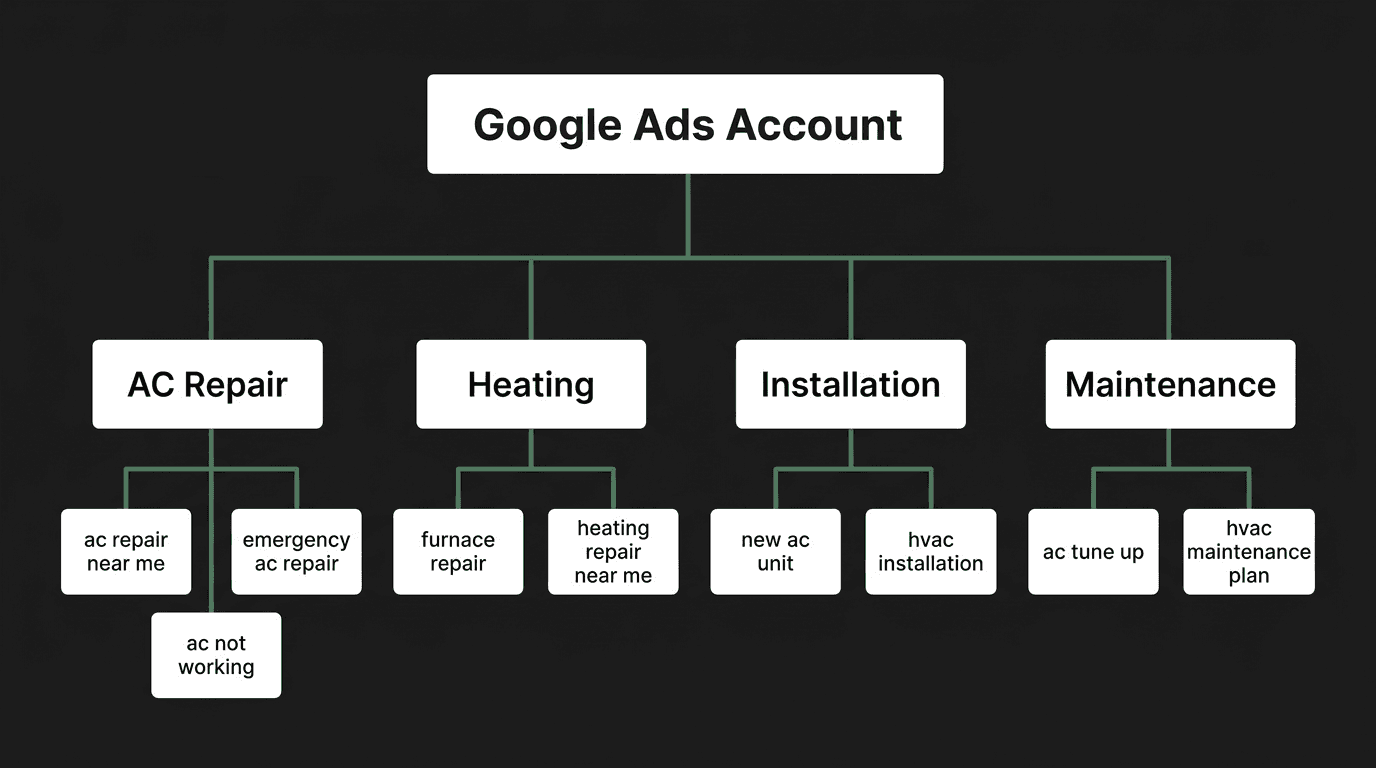
Within each campaign, create 3-5 ad groups organized by intent. Each ad group should contain 10-20 closely related keywords and 2-3 responsive search ads written specifically for that keyword cluster.
4) Keyword Selection
Start with high-intent keywords - searches from people who need HVAC service right now. These cost more per click but convert at much higher rates. You can expand to broader keywords later once your campaigns are profitable.
High-Intent Keywords to Start With
- Emergency keywords: "emergency AC repair," "24 hour HVAC," "AC stopped working"
- Repair keywords: "AC repair near me," "furnace repair [city]," "HVAC repair service"
- Location keywords: "HVAC company [city]," "AC contractor [city]," "heating company near me"
- Installation keywords: "new AC unit cost," "HVAC installation [city]," "replace AC unit"
- Brand + service: "Carrier AC repair," "Trane furnace repair," "Lennox HVAC service"
Negative Keywords to Add Immediately
Negative keywords prevent your ads from showing on irrelevant searches. Add these to every campaign on day one to stop wasting budget:
Match Types Explained Simply
Exact Match [keyword]
Your ad shows only for that exact search (or very close variations). Example: [ac repair tampa] shows for "ac repair tampa" and "tampa ac repair." Best for controlling spend and testing.
Phrase Match "keyword"
Your ad shows for searches that include your keyword's meaning. Example: "ac repair" shows for "best ac repair near me" and "affordable ac repair service." Good balance of reach and relevance.
Broad Match keyword
Your ad shows for any search Google considers related. Example: ac repair might show for "HVAC maintenance tips." Avoid broad match until you have strong conversion data and a solid negative keyword list.
Start With Exact and Phrase Match
Do not use broad match keywords when starting out. They'll eat through your budget on irrelevant searches. Start with exact match for your top keywords and phrase match for secondary ones. Only add broad match after 60+ days of conversion data.
5) Writing Ads That Convert
Google Ads uses Responsive Search Ads (RSAs), where you provide up to 15 headlines and 4 descriptions. Google then tests combinations to find what performs best. Here's how to write them for HVAC.
Headline Formula (30 characters max each)
- Service + Location: "AC Repair in Tampa" or "Tampa Furnace Repair"
- Urgency: "Same-Day AC Repair" or "24/7 Emergency HVAC"
- Trust signal: "Licensed & Insured HVAC" or "5-Star Rated Contractor"
- Offer: "Free Estimates Available" or "$50 Off First Repair"
- CTA: "Call Now for Fast Service" or "Book Online Today"
Description Examples (90 characters max each)
"Fast, reliable AC repair from licensed technicians. Same-day service available. Call now for a free estimate."
"Trusted by 500+ Tampa homeowners. We fix all brands. No hidden fees. Satisfaction guaranteed."
"New AC installation starting at $3,999. Financing available. Free in-home consultation. Call today."
Ad Extensions (Do Not Skip These)
Ad extensions make your ads bigger and more clickable. They also improve your Quality Score, which lowers your cost per click. Set up all of these:
Call Extensions
Adds a clickable phone number to your ad. Essential for HVAC. Set call hours to match your availability.
Sitelink Extensions
Links to specific pages: "AC Repair," "Financing Options," "Reviews," "Service Areas." Add 4-6 sitelinks per campaign.
Callout Extensions
Short phrases that highlight differentiators: "Licensed & Insured," "Same-Day Service," "Free Estimates," "Financing Available."
Location Extensions
Shows your business address and a map pin. Requires a linked Google Business Profile. Builds trust with local searchers.
Write for the Customer, Not Google
6) Budget & Bidding Strategy
How much should you spend? That depends on your market and service area, but here are proven starting points for HVAC contractors. For a deeper breakdown, read our complete HVAC Google Ads budget guide.
Starting Budget Benchmarks
$50-$100
Daily budget to start
$1,500-$3,000
Monthly ad spend (starting)
$5,000-$10,000
Monthly budget (scaling)
3-5x
Target ROAS (return on ad spend)
Bidding Strategies Explained
Manual CPC (Best for Starting)
You set the maximum price you'll pay per click. Start with $10-$15 for repair keywords and $15-$25 for installation keywords. This gives you full control while you learn what converts.
Maximize Conversions (After 30+ Conversions)
Google's algorithm automatically adjusts your bids to get the most conversions within your budget. Only switch to this after you have 30+ conversions in 30 days. The algorithm needs data to work.
Target CPA (After 50+ Conversions)
You tell Google your target cost per lead (e.g., $50), and it optimizes bids to hit that target. This is the most efficient strategy, but requires enough conversion history to be effective.
Don't Start With Smart Bidding
Automated bidding strategies like Maximize Conversions and Target CPA need conversion data to work. If you switch to these on day one, Google has no data to optimize against and will spend your budget inefficiently. Start with Manual CPC for the first 4-6 weeks, then transition.
When to Increase Budget
Increase your budget when you consistently see a positive return. If you're spending $2,000/month and generating $10,000+ in booked jobs, you have room to scale. Increase by 20-25% at a time and monitor for two weeks before increasing again. Never double your budget overnight - it disrupts the algorithm.
7) First 30 Days: What to Monitor
Launching is just the beginning. The first 30 days are critical for optimization. Here's your daily and weekly checklist to make sure your budget is working hard.
Daily Tasks (First 2 Weeks)
- Check the Search Terms Report - This shows the actual searches that triggered your ads. Add irrelevant terms as negative keywords immediately. You'll find surprises like "HVAC jobs" or "DIY AC repair" eating your budget.
- Review cost per click - Are CPCs in line with your bids? If you're consistently hitting your max bid, consider raising it for high-converting keywords or lowering it for poor performers.
- Check conversion tracking - Verify that calls and form submissions are still recording correctly. Tracking can break after website updates.
Weekly Tasks
- Review Quality Score - Check each keyword's Quality Score (1-10). Scores below 5 mean your ad relevance or landing page needs work. Aim for 7+ on your top keywords.
- Analyze CTR by ad group - Click-through rates below 3% signal weak ad copy or mismatched keywords. Rewrite underperforming ads and test new headlines.
- Check cost per conversion - Calculate your actual cost per lead for each campaign. Pause keywords or ad groups that consistently exceed your target CPL by 2x or more.
- Review geographic performance - Check which zip codes and cities are converting. Exclude areas with high spend but no conversions. Increase bids in your best-performing areas.
- Update negative keywords - Add 5-10 new negatives per week based on search term data. A clean search terms report is the foundation of a profitable campaign.
Key Metrics & Benchmarks for HVAC
3-8%
Target CTR for Search Ads
7+
Target Quality Score
5-10%
Landing page conversion rate
$30-$80
Target cost per lead
The 80/20 Rule of Optimization
After 30 Days: Next Steps
Transition Bidding Strategy
If you have 30+ conversions, test switching one campaign to Maximize Conversions. Run it for two weeks and compare cost per lead against your Manual CPC campaign.
Expand Keywords
Add phrase match versions of your best exact match keywords. Consider adding brand-name keywords for specific HVAC equipment (Carrier, Trane, Lennox).
Test New Ad Copy
Create new responsive search ads with different angles: price-focused, speed-focused, and trust-focused. Let them run for 2-4 weeks before picking winners.
Consider a PPC Agency
If managing campaigns takes more than 5 hours/week, consider hiring help. Read our guide on choosing the right HVAC PPC agency to avoid common pitfalls.
Want help with PPC management? Read our guide to choosing the right HVAC PPC agency before signing with anyone. And if you're not sure whether to invest in Google Ads or Local Services Ads, our LSAs vs Search Ads comparison breaks it down side by side.
Quick Reference: HVAC Google Ads Benchmarks
$8-$25
Average cost per click
$30-$80
Average cost per lead
15-25%
Lead-to-customer close rate
3-5x
Expected return on ad spend
These benchmarks vary by market, competition, and service type. Emergency repair keywords tend to have higher CPCs but also higher conversion rates. Installation keywords have higher cost per lead but much higher revenue per job. The key is tracking everything from click to closed job so you know your true ROI.