The Problem: What Was Broken
West Florida Air had been with another agency for months, but weren't seeing more customers and weren't sure what was actually working. Here's what our audit found:
8.2 Second Load Time
Their WordPress site scored 72 on Lighthouse with an 8+ second load time. According to Google's data, pages taking 1-3 seconds lose 32% of visitors. At 8 seconds, that number climbs significantly. A lot of traffic was leaving before the page even loaded.
Toxic Backlink Profile
The old agency bought backlinks from sketchy spam sites like seo-backlinks-directory-2024.xyz. Google flags this stuff instantly. Those link farm backlinks were actively tanking their rankings.
No Conversion Tracking
They didn't know which ads generated calls, which keywords actually converted, or what they were really paying per job. This made it really difficult to iterate and improve.
The Website: Built to Convert
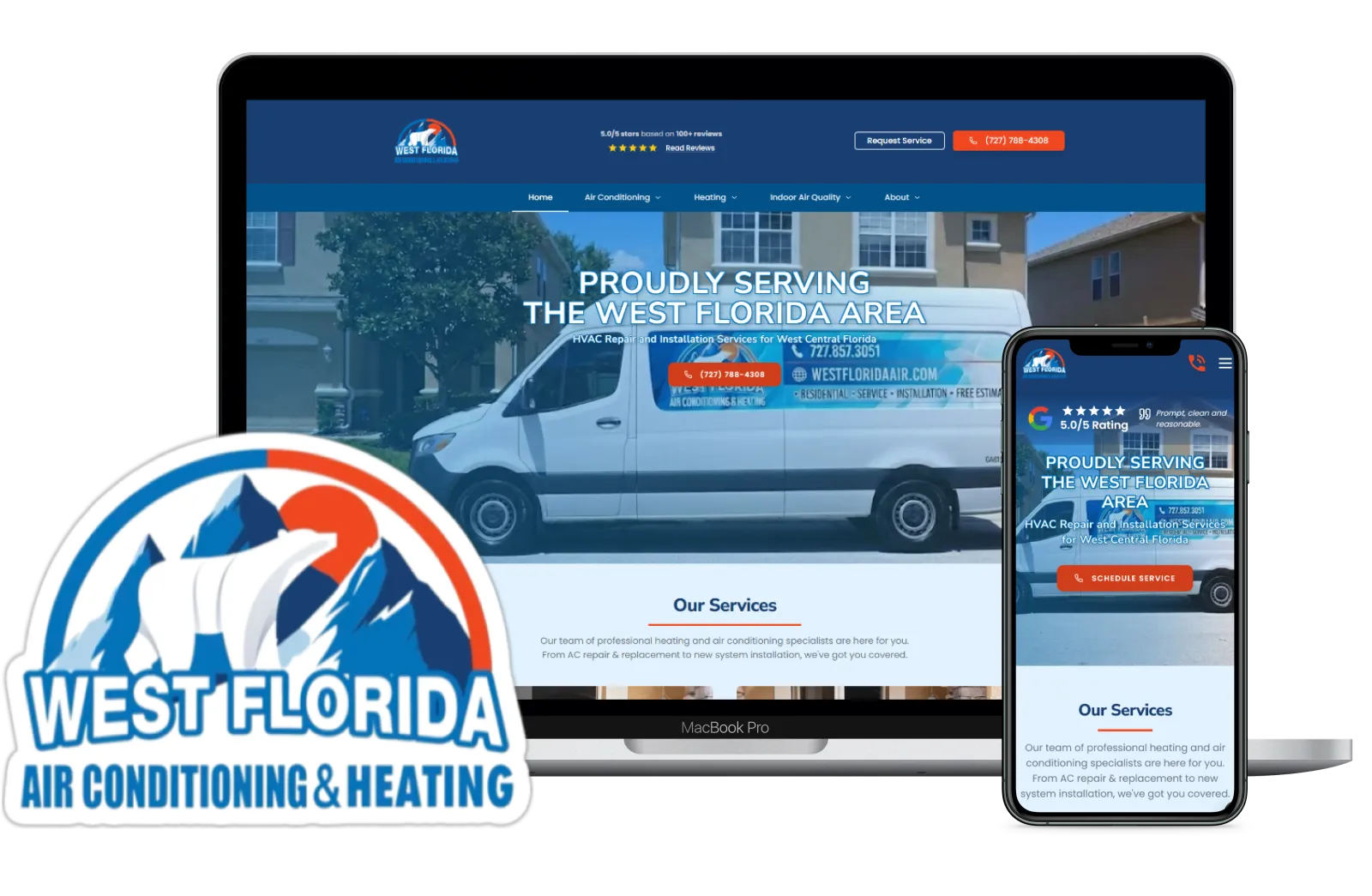
We gave them a fresh build of their website: designed to their liking, conversion optimized, and SEO optimized. Here's the framework we used to build it:
Site Architecture
SEO is as much about structure as keywords. One page per service, one per city, plus a blog to catch informational searches.
/
├── /                          Homepage
├── /about                     About
├── /contact                   Contact
├── /services                  Services overview
├── /financing                 Financing
├── /reviews                   Reviews
├── /cities-served             Cities served
│
├── /blog                      Blog index
│   ├── /blog/[slug]           Individual post
│   └── /blog/tag/[slug]       Posts by tag
│
├── /air-conditioning          AC services
│   ├── /maintenance
│   └── /replacement
│
├── /heating                   Heating services
│   ├── /furnace-installation
│   ├── /furnace-repair
│   ├── /heat-pump-installation
│   └── /heat-pump-repair
│
├── /indoor-air-quality        IAQ services
│   ├── /air-purification
│   ├── /humidity-control
│   └── /uv-lights
│
├── /ac-repair                 AC repair landing
│   ├── /ac-repair/[city]      City-specific AC repair
│   └── /ac-repair/emergency   Emergency AC repair
│
├── /heating-repair            Heating repair landing
│   └── /heating-repair/[city] City-specific heating
│
├── /lp-ac-repair              A/B test variant
│   ├── /lp-ac-repair/[city]
│   └── /lp-ac-repair/emergency
│
└── /lp-heating-repair         A/B test variant
    └── /lp-heating-repair/[city]
One Page Per Service
AC repair gets its own page. Furnace installation gets its own. Heat pump repair too. Google ranks you specifically for each service, and visitors don't have to search around to find what they want.
One Page Per City
Largo? St. Pete? They each get their own page at /ac-repair/largo, /ac-repair/st-pete. Perfect for ranking when someone searches "AC repair + city name."
Blog for Long-Tail SEO
The blog captures people Googling "why is my AC freezing up?" or "how often should I change my air filter?" They're not ready to buy yet, but you're building trust and backlink opportunities.
Optimizing Pages for Organic Search (SEO)
Landing pages are built for conversions from ads. Service pages, city pages, and your homepage are built for Google. Different purpose, different approach. Here's what goes into an SEO-optimized page:
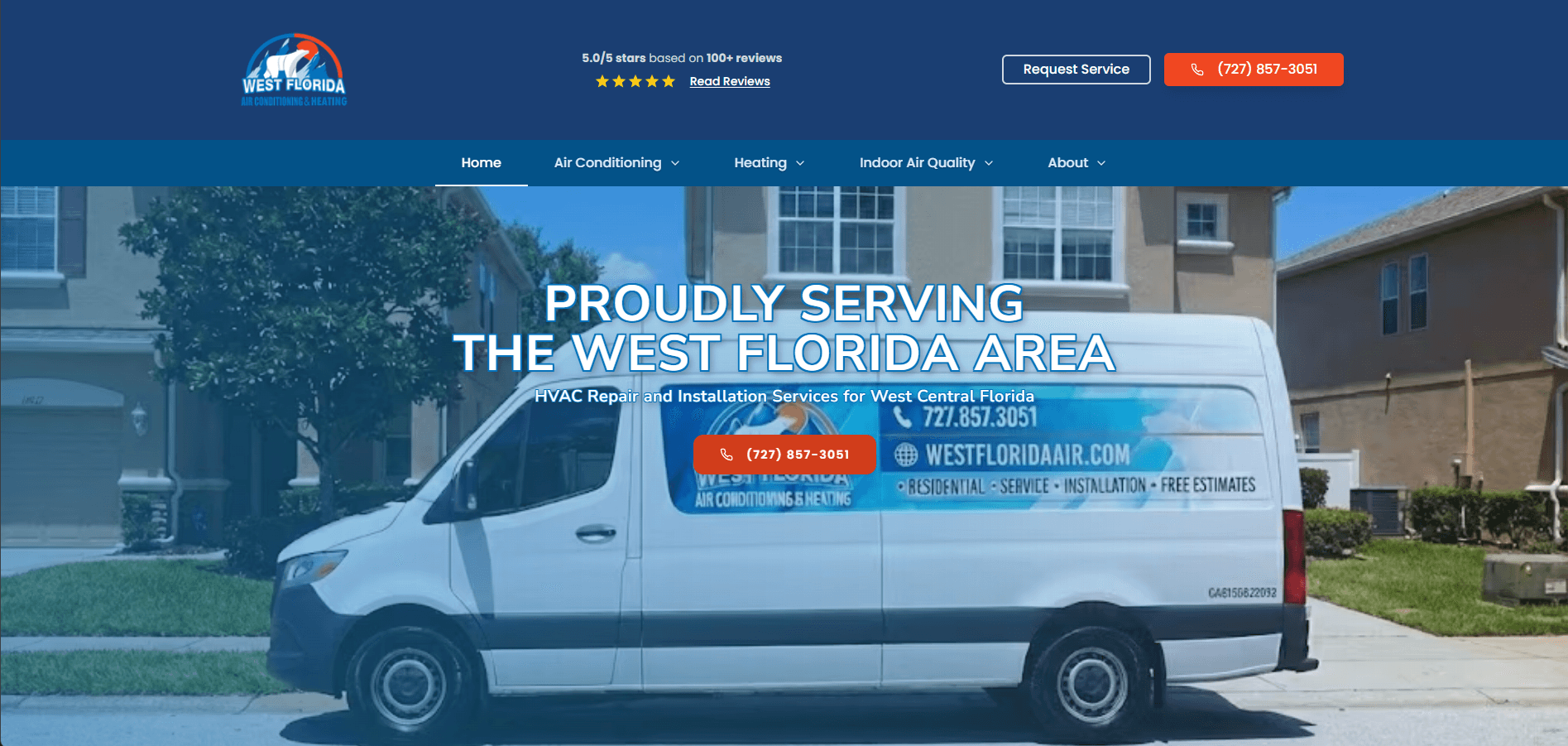
The homepage balances user experience with SEO fundamentals: fast load times, keyword-rich content, clear structure, and FAQ sections that target common search queries.
Performance
Google ranks fast sites higher. Check your scores with Google Lighthouse. Aim for 90+ on Performance, Accessibility, and SEO. Compress images, minimize code, use a fast host.
Content Depth
Thin pages don't rank. Each service page needs substantial text content focused on specific keywords. Research what people actually search for using Google Keyword Planner, then write content that answers those queries.
FAQ Sections
FAQs serve double duty: they answer real customer questions and target long-tail search queries. "How much does AC repair cost in Tampa?" is a question someone types into Google. Your FAQ can be the answer.
Schema Markup
Structured data helps Google understand your content and can trigger rich results in search. We cover this in detail in the next section.
How to Check Your Lighthouse Score
Open Chrome, go to your website, press F12 to open DevTools, click the "Lighthouse" tab, and run an audit. Or visit pagespeed.web.dev and paste your URL. You'll get scores for Performance, Accessibility, Best Practices, and SEO, plus specific recommendations for improvement.
Organic Search Growth
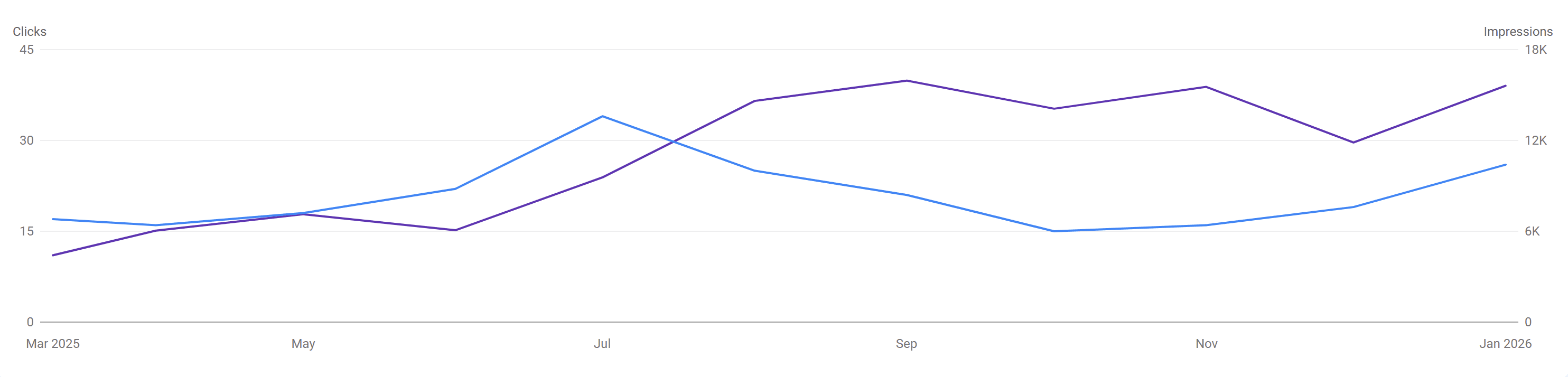
The new site we built and the SEO work paid off. Six months after launch, organic impressions jumped from 4.5k to 15.5k per month. That's 244% more visibility with zero ad spend.
Starting Impressions
4.5k/mo
Current Impressions
15.5k/mo
Growth
+244%
Pro Tip: Submit to Google Search Console
After launching your site, submit it to Google Search Console and upload your sitemap (usually at /sitemap.xml). This tells Google your site exists and speeds up indexing. Don't just wait for Google to find you.
Schema Markup for Rich Results
Schema markup is code you add to your website that tells Google exactly what your business is, what services you offer, and where you operate. When Google understands this information, it can display enhanced search results with star ratings, review counts, service areas, and other details directly in the search listing.
These enhanced listings stand out from plain text results and earn significantly higher click-through rates. A listing showing "4.8 stars from 127 reviews" gets more clicks than one without any ratings displayed.
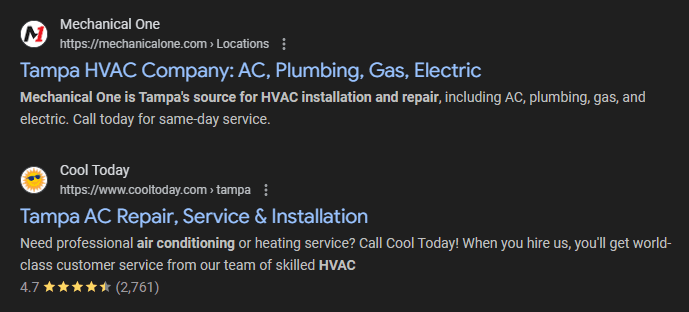
Notice the difference: Cool Today shows "4.7 stars from 2,761 reviews" right in the search result. Mechanical One has no ratings displayed. Which one would you click? That's the power of schema markup.
Schema types we implemented:
- HVACBusiness schema
- Service schema (per service)
- ServiceArea schema
- AggregateRating + Reviews
- FAQPage schema
- BreadcrumbList
Landing Page Design
Structure only matters if people convert when they land. Here's what we built into every landing page:
Click-to-Call in Header
Phone number front and center on every page. Sticky on mobile. One tap, instant call.
Trust Signals Above Fold
5-star reviews, licensing badges, "Veteran-Owned" label. All visible immediately when they land.
Service-Specific Pages
Each ad leads to a dedicated page for that service. AC repair ads go to the AC repair page, furnace ads go to the furnace page.
Clear Value Proposition
Hero section instantly answers "why choose us?" with same-day service, fair pricing, and licensed technicians.
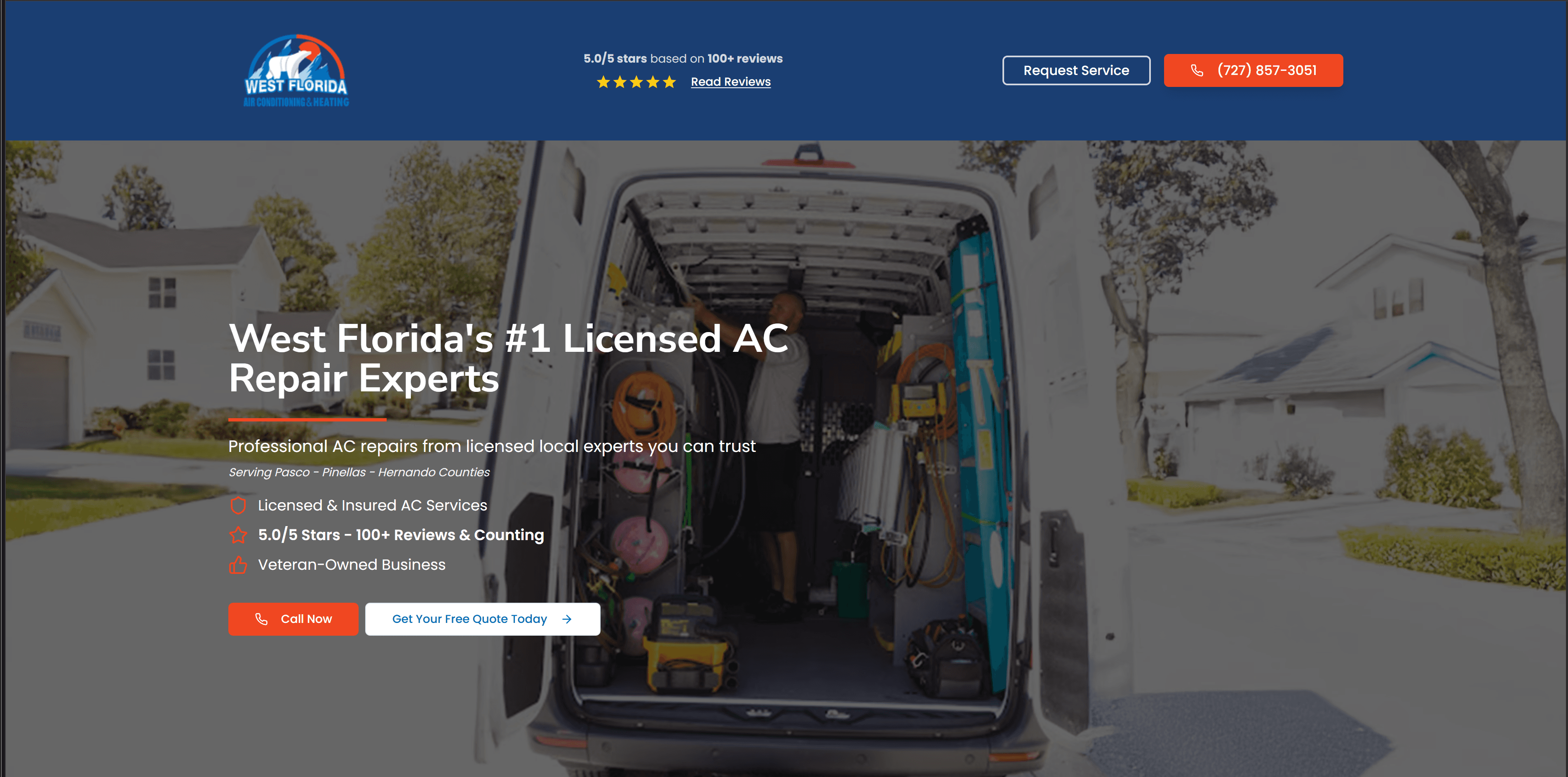
Every element above the fold is designed to build trust and make it easy to call: phone number in the header, 5-star rating with review count, trust badges, and a prominent "Request Service" button.
A/B Testing Landing Pages
A/B testing lets you compare two versions of a landing page to see which one converts better. Instead of assuming what works, you send traffic to both versions and let the data tell you which headline, layout, or call-to-action actually gets more people to call. Here's the process we use:
The Process
- 1Create two landing page variants: Same content, one change (headline, CTA, layout, etc.). Use different URLs like
/ac-repairvs/lp-ac-repairor/ac-repair/avs/ac-repair/b - 2Duplicate the ad group in Google Ads: Same keywords, same ad copy, same bids. Only difference is the landing page URL. Label them clearly (e.g., "AC Repair - A" and "AC Repair - B")
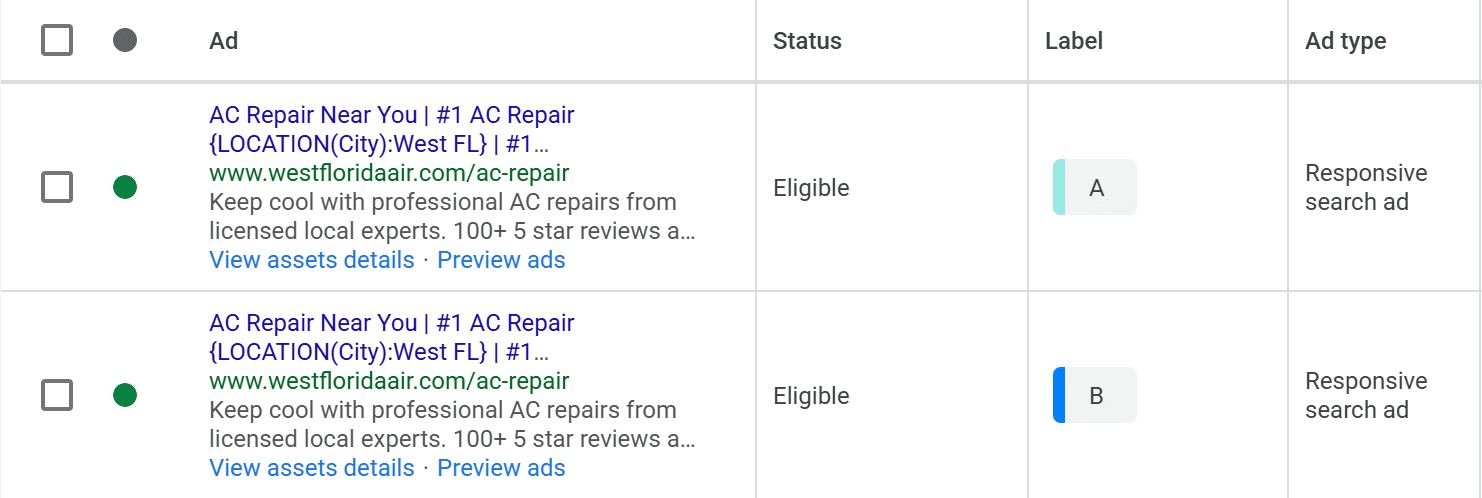
Same exact ad, different landing page URLs. Labels make it easy to compare performance.
- 3Run for one month: Get both variants enough traffic to mean something. Don't tweak mid-test.
- 4Keep the winner, iterate on the loser: The winning variant stays. Update the losing variant with a new test (different change) for the next month.
Why This Works
Change one thing at a time, you know exactly what worked. Six months later? Six tests run. Your page is way better than day one, and you've got the numbers to prove it.
Ideas for Tests (One at a Time)
Remove the navbar
Eliminates distractions. Only option is to call or bounce.
Contact form in the hero
Some people won't call but will fill a form. Test with and without.
Different headline
"#1 AC Repair in Tampa" vs. "Same-Day AC Repair" vs. "5-Star Rated AC Service"
Trust indicators
Google reviews vs. BBB badge vs. "Veteran-Owned" vs. years in business.
CTA button text
"Call Now" vs. "Get Free Quote" vs. "Schedule Service"
Hero image
Technician photo vs. happy family vs. equipment vs. no image.
Phone number size/placement
Sticky header vs. floating button vs. inline in hero.
Page length
Short (hero + CTA only) vs. long (full content with FAQs, reviews).
The Google Ads Playbook
Here's the exact campaign structure, keywords, and ad copy we used for West Florida Air. Full playbook below.
Campaign Structure
Active Campaigns
- Brand - WFA
- Search-AC-Repair-2
Ad Groups By
- Location (St. Pete, Largo, etc.)
- Intent (Near Me, Emergency)
- Service Type (AC Repair, Heat)
Bidding Strategy
- Manual CPC
- Exact match keywords
Why Run a Brand Campaign?
A brand campaign targets searches for your business name. The goal is to make sure anyone searching for you lands on your site, not a competitor's ad. Brand keywords are cheap since you're the most relevant result. We typically bid $3-4 per click with a $100/month budget using manual CPC.
Beyond protecting your brand visibility, these campaigns generate conversions that train Google's algorithm. When Google sees conversions coming from your account, it gets better at finding similar users for your other campaigns.
How We Structured the AC Repair Campaign
We started with three types of ad groups: standard repair keywords, emergency keywords, and location-specific ad groups for each city we wanted to target (St. Pete, Largo, Clearwater, etc.). This structure lets you target city-specific keywords and see exactly what's working in each area.
We recommend setting it up this way so you can test different approaches. We also tested standard repair keywords versus replacement keywords to see which converted better.
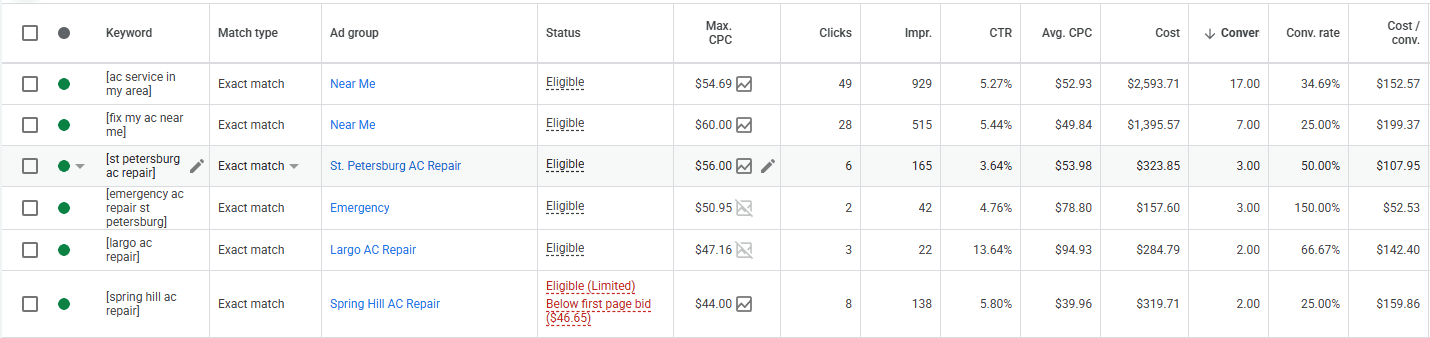
After months of testing, the keywords listed below are the ones that actually convert. We tested ten times as many keywords to get to this list. That's the value here: we've already spent the money and done the testing to find what works. These keywords may not convert exactly the same in your market, so you'll still need to do some testing, but this gives you a strong starting point instead of starting from zero.
Key Insight: Test Your Cities
When you start, create an ad group targeting keywords for every city you service that has sufficient search volume. We started with 32 different cities and now only target 3, but it took testing to figure that out.
For example, our city-specific keywords had high conversion rates but varied volume:
- • [st petersburg ac repair]: 50% conversion rate
- • [largo ac repair]: 66.67% conversion rate
This is why it's worth testing different cities to see which ones convert at a reasonable rate in your market.
Keyword Breakdown
We didn't start with these keywords. We ended up here after months of testing. Here's the process:
How We Built Our Initial Keyword List
Step 1: Brainstorm with AI. We started by asking ChatGPT for HVAC-related keywords with buying intent. Things like "ac repair near me," "emergency hvac service," "ac not cooling." This gave us a big list to work from.
Step 2: Validate with Google Keyword Planner. We took that list into Google Keyword Planner and filtered for keywords with:
- High buying intent — "ac repair" not "how does ac work"
- Decent search volume — enough traffic to actually test
- Medium to low competition — avoid the most expensive keywords while you're learning
Pro Tip: Set Your Location in Keyword Planner
By default, Keyword Planner shows data for the entire United States. Change the location to your state (we used Florida) to see volume that actually reflects your market. Florida is broad enough to show real trends but specific enough to be relevant. If you go too narrow (single city), the volume numbers get unreliable. State-level is the sweet spot.
From Hundreds of Keywords to Six Winners
We started with hundreds of keywords: generic HVAC terms, service-specific terms (ac repair, furnace installation), and location-based variations for every city in the service area (Largo, St. Pete, Spring Hill, etc.).
All of them went in as phrase match initially. We let them run, watched the search terms report, and added negative keywords to cut waste. Over the course of several months, we saw what actually converted and what just burned money.
The keywords below are the survivors. They've been through the gauntlet. We switched them to exact match to maximize efficiency once we knew they worked. This is what Google has optimized for and what brought in the most conversions.
Your results will vary — different market, different competition, different service area. But this is a battle-tested starting point. These keywords have been through real volume and real testing.
| Keyword | Match | Clicks | Conv. | Conv. Rate | Cost/Conv. | Avg CPC |
|---|---|---|---|---|---|---|
| [ac service in my area] | Exact | 49 | 17 | 34.69% | $152.57 | $52.93 |
| [fix my ac near me] | Exact | 28 | 7 | 25.00% | $199.37 | $49.84 |
| [st petersburg ac repair] | Exact | 6 | 3 | 50.00% | $107.95 | $53.98 |
| [emergency ac repair st petersburg] | Exact | 2 | 3 | 150.00% | $52.53 | $78.80 |
| [largo ac repair] | Exact | 3 | 2 | 66.67% | $142.40 | $94.93 |
| [spring hill ac repair] | Exact | 8 | 2 | 25.00% | $159.86 | $39.96 |
Copy These Keywords (Exact Match)
Paste these into Google Ads as exact match keywords. Replace city names with your service areas.
[ac service in my area]
[fix my ac near me]
[ac repair near me]
[emergency ac repair]
[ac repair [CITY]]
[emergency ac repair [CITY]]
[hvac repair near me]
[air conditioning repair near me]
8 keywords — one per line, ready to paste into Google Ads
Ad Copy That Converts (Headlines, Descriptions, Callouts, etc.)
Here's what actually worked. Copy these, adapt them to your business, use them.
Top Performers
Headlines with location insertion and "Veteran-Owned" performed much better than others.
Headlines (15 used)
- 1.AC Repair Near You
- 2.#1 AC Repair {LOCATION}
- 3.#1 {LOCATION} AC Technician
- 4.Fast AC Fix {LOCATION}
- 5.Free Quote {LOCATION}
- 6.See Your Technician Today
- 7.Call Now | Available 24h
- 8.{LOCATION}'s Best AC Repair
- 9.5.0/5 Stars - 100+ Reviews
- 10.Get Your Free Quote Today
- 11.24/7 Emergency AC Repair
- 12.Veteran-Owned AC Services
- 13.West Florida Air Conditioning
- 14.Licensed & Insured AC Services
- 15.Outstanding Customer Service
Descriptions (4 used)
Description 1:
"Keep cool with professional AC repairs from licensed local experts."
Description 2:
"100+ 5 star reviews and counting! Get your free quote today."
Description 3:
"Professional AC repairs by a veteran-owned local business. Get your free quote today."
Description 4:
"Affordable same-day AC repairs for Pasco, Pinellas, and Hernando county residents."
Negative Keywords List (Less Wasted Clicks)
These are searches that may look relevant to Google but aren't from people with buying intent. Someone searching "how to fix AC" is looking for DIY help, not a contractor. We focus strictly on buying-intent keywords. With a larger budget, targeting some of these informational keywords could make sense for brand awareness, but that's not what we're optimizing for here.
Finding Wasted Spend in Your Search Terms
You should be reviewing your search terms on a weekly to bi-weekly basis. In the beginning, check them almost daily to make sure you're not wasting clicks on irrelevant searches. Once your campaign matures and you've built out a solid negative keyword list, you can move to weekly reviews.
Here's how to find the search terms eating your budget. In Google Ads, go to Insights & Reports → Search Terms, then filter for Clicks > 1 and Conversions < 1. This shows you every term getting clicks but zero conversions.
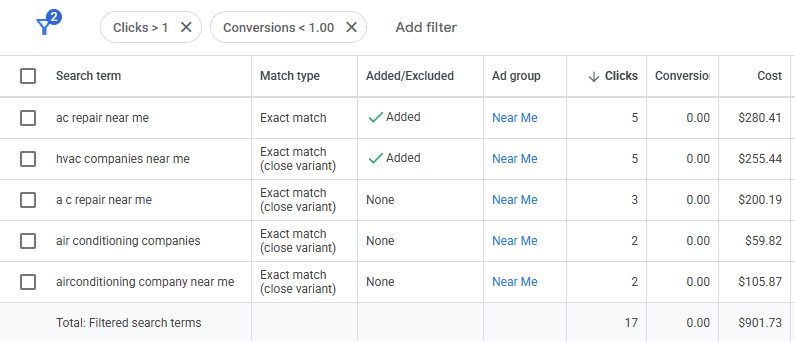
What to do with these terms:
- Add as negatives: If the term is irrelevant, add it to your negative keyword list. For example, "air conditioning company near me" could be someone looking for a job, a telemarketer, or a supplier. Not a customer needing service.
- Pause or downbid: If it's relevant but not converting, either pause it or lower the bid significantly
- Check your landing page: Sometimes the term is good but your page isn't matching the intent
In this example: $901 spent on 17 clicks with zero conversions. That's money you get back by cleaning this up.
The Tracking System: How We Proved ROI
You need to know two things: what you spent and what you made. Ad platforms only tell you the first one. Tracking gives you the second.
Step 1: Set Up Conversions in Google Ads
First, you need to tell Google what counts as a conversion. For HVAC, that's phone calls and contact form submissions. You'll set these up in Google Ads under Goals → Conversions.
To track these actions on your website, you'll need Google Tag Manager (GTM). GTM is a container that holds all your tracking codes in one place. The basic flow is: install GTM on your site, create tags for your conversion actions, and connect them to Google Ads. Search "how to set up conversion actions in Google Ads with GTM" for step-by-step instructions.
Step 2: Call Tracking (CallRail)
We use CallRail for call tracking. The key feature is dynamic number insertion, which swaps the phone number on your website based on where the visitor came from. This lets you attribute calls to specific Google Ads campaigns and keywords.
- Dynamic number insertion shows different numbers to different traffic sources
- Calls attributed to specific keywords via URL parameters from Google Ads
- Call recordings for quality assurance and training
- CallRail sends conversion data back to Google Ads automatically

Step 3: Connect to Your CRM
We use Housecall Pro for job management. The goal is to tag every job with its lead source so you can see which marketing channels are actually generating revenue.
We don't automatically tag every job. Instead, we do a monthly review where we go through CallRail calls and manually tag them in Housecall Pro. This takes a few hours but ensures accuracy. If you have access to the Housecall Pro API, you can automate this process. There's also a direct integration, but it can be finicky to get working properly.
If you're not using a CRM yet, you can start with something simple like a Notion database or spreadsheet. Track the lead source for each job manually, then add it to your CRM (like Housecall Pro or Jobber) as jobs close. The important thing is having some system to attribute revenue back to your marketing spend.
Our Tracking Stack
Conversion Tracking
- Google Tag Manager
- Google Ads Conversions
Call Tracking
- CallRail
- Dynamic number insertion
Job Management
- Housecall Pro
- Monthly lead source tagging
The Attribution Flow
Google Ad Click
Landing Page
Phone Call
(tracked)
CRM
(lead source tagged)
Job Revenue
The Results

Total Revenue Generated
$54,432
6.2:1 ROAS: For every dollar spent, six came back
BONUS #1: Download the Campaign Template
This is the actual campaign structure. No gatekeeping. This is the structure that drove $54K in revenue. Adapt it to your market, test your own headlines, but the foundation is here.
How to Use This Template
- 1Download the CSV: Click the button below
- 2Find and replace
[YOUR BUSINESS NAME]with your business name (e.g., "West Florida Air") - 3Find and replace
[YOUR DOMAIN]with your domain (e.g., "westfloridaair.com") - 4Upload to Google Ads Editor: Follow the import instructions below
This template includes ads only. Copy the keywords and negative keywords from the sections above (they have "Copy All" buttons).
Here's what the template looks like:

Each row is an ad group with A/B test labels. Find and replace the placeholders and you're ready to import.
How to Import Into Google Ads Editor
- 1Download and install Google Ads Editor (free)
- 2Open the app and sign in with your Google Ads account
- 3Go to Account → Import → From file
- 4Select the CSV file you downloaded
- 5Update locations, phone numbers, and URLs for your business
- 6Click "Post" to push changes to your Google Ads account
BONUS #2: Build It With AI
Want to implement this strategy yourself? We created an AI-ready document with the entire playbook. Copy and paste it into ChatGPT, Claude, or your AI assistant of choice and let it help you build your website content, Google Ads campaigns, and tracking setup.
What's in the file:
- Complete website structure and page templates
- Full Google Ads campaign structure with keywords
- Ad copy templates and negative keyword lists
- Tracking setup instructions
- Ready-to-use prompts for your AI assistant
Open the file, copy everything, paste it into ChatGPT or Claude, and start chatting. The AI will ask for your business details and guide you from there.