

Choosing a CRM is one of the most consequential decisions a home service contractor makes. The right system pays for itself in fewer missed calls, faster dispatching, and cleaner invoicing. The wrong one creates double-entry headaches, frustrated techs, and an expensive contract you regret signing.
This guide is based on hands-on experience helping HVAC, roofing, plumbing, and electrical contractors evaluate and set up CRMs that integrate with their marketing stack. No affiliate commissions or vendor partnerships behind these recommendations.
Below, I break down the five most popular CRMs for home service contractors: ServiceTitan, Housecall Pro, Jobber, JobNimbus, and FieldEdge. Honest pros and cons, a side-by-side comparison table, and a decision framework to help you pick the right one for your contracting business.
1) Quick Overview Stats
68%
Home Service Companies Using a CRM
29%
Avg. Productivity Increase
34%
Avg. Revenue Increase from CRM
45%
Reduction in Missed Leads
These numbers come from industry surveys and real-world results from home service contractors who switched from spreadsheets or pen-and-paper to a dedicated CRM. The improvements are most dramatic for companies with 3+ technicians where scheduling and dispatching complexity increases significantly, regardless of trade.
2) Why Home Service Companies Need a CRM
Whether you run an HVAC company, a roofing crew, a plumbing shop, or an electrical contracting business, the operational challenges are the same. If you're still managing your business on spreadsheets, whiteboards, or the notes app on your phone, you're leaving money on the table. Here's why:
Missed Calls = Missed Revenue
When a homeowner calls for a roof inspection, HVAC repair, or a plumbing emergency and nobody picks up, they call the next company on Google. A CRM with call tracking logs every inbound call, assigns it to a record, and lets your CSR follow up within minutes. No more sticky notes that fall off the desk.
Dispatching Without the Chaos
Manual dispatching works when you have two techs and 10 jobs a week. At 5+ techs and 30+ jobs, it becomes a bottleneck. A CRM's dispatch board shows tech locations, job status, and drive times in real time, so you can route the closest available tech to emergency calls, whether that's a burst pipe, a storm-damaged roof, or an HVAC failure.
Customer History at Your Fingertips
When a tech arrives at a home and can pull up the full service history — equipment age, past repairs, warranty status, and notes from previous visits — they close more jobs at higher ticket values. This matters just as much for an electrician reviewing a panel history as it does for an HVAC tech checking system age.
Invoicing and Payment Collection
Sending invoices from the field, collecting payments on the spot, and syncing everything to QuickBooks automatically eliminates the end-of-day paperwork pile. Techs finish the job, collect payment, and move to the next call. Cash flow improves immediately across every trade.
Marketing That Actually Works
A CRM tracks where every lead comes from: Google Ads, organic search, referrals, or yard signs. When you know your marketing metrics, you stop wasting money on channels that don't convert and double down on the ones that do.
The Real Cost of No CRM
Home service contractors without a CRM report losing an average of 15-20% of inbound leads to missed follow-ups, lost messages, and scheduling errors. For a company generating 100 leads per month at an average ticket of $500, that's $7,500-$10,000 in lost revenue every single month — across any trade.
3) Quick Comparison Table
Here's how the top five home service CRMs stack up side by side. Scroll right on mobile to see all columns.
| ServiceTitan | Housecall Pro | Jobber | JobNimbus | FieldEdge | |
|---|---|---|---|---|---|
| Starting Price | Custom quote | $65/mo | $49/mo | $49/mo | Custom quote |
| Best For | 10+ techs | 1-15 techs | 1-10 techs | Roofers | 5-20 techs |
| Mobile App | |||||
| Dispatching | |||||
| Invoicing | |||||
| Marketing Features | |||||
| Call Tracking | |||||
| QuickBooks Integration | |||||
| Customer Portal | |||||
| Best Trade Fit | HVAC/Plumbing | All trades | All trades | Roofing | HVAC/Mechanical |
Pricing shown is the lowest publicly available tier as of early 2026. ServiceTitan and FieldEdge require a sales call for custom pricing. Actual costs vary based on number of users, add-on modules, and contract terms.
4) ServiceTitan
ServiceTitan is the 800-pound gorilla in home service CRM software. Built specifically for the trades, it's the most feature-rich platform on this list — and the most expensive. Large operations that run 10+ trucks swear by it because no other platform matches its depth in reporting, pricebook management, and marketing attribution.
Best trade fit: ServiceTitan was originally built for HVAC and has the deepest feature set for mechanical trades. It also serves plumbing and electrical contractors extremely well. Roofing companies can use it but often find JobNimbus more purpose-built for their workflow.
Key Features
- Pricebook Management: Build and maintain flat-rate pricing with automatic markups, good-better-best options, and tech-facing presentation tools that help sell higher-ticket jobs across every trade.
- Marketing Scorecard: Track every lead back to its source (Google Ads, LSAs, SEO, direct mail) with built-in call recording and lead attribution. Know exactly which campaigns generate revenue, not just clicks.
- Advanced Reporting: Detailed dashboards for revenue per tech, average ticket size, conversion rates by campaign, membership revenue, and equipment sales performance. This is where ServiceTitan genuinely outclasses the competition.
- Dispatch Board: Drag-and-drop dispatching with real-time GPS tracking, job status updates, and automatic tech assignment based on skill set, location, and availability.
- Membership Management: Sell, track, and auto-renew maintenance agreements. Works for HVAC tune-up plans, plumbing inspection contracts, and electrical safety agreements alike.
ServiceTitan - Pros & Cons
Pros
Cons
Who ServiceTitan Is For
If you run a $2M+ home service operation with 10 or more technicians — especially HVAC, plumbing, or electrical — ServiceTitan is likely worth the investment. The reporting alone helps you identify revenue leaks and underperforming techs that cost you more than the software subscription. Smaller companies and roofing-only businesses typically find it overkill.
5) Housecall Pro
Housecall Pro hits the sweet spot for most home service contractors. It's affordable, easy to learn, and covers the essentials without overwhelming your team. I've seen 3-person shops — HVAC, plumbing, and electrical alike — get fully operational on Housecall Pro in under a week, including techs who "don't do computers."
Best trade fit: Housecall Pro works well across all home service trades. It's not as specialized as ServiceTitan for HVAC or JobNimbus for roofing, but its versatility makes it the go-to for multi-trade shops and smaller teams that want one platform for everything.
Key Features
- Online Booking: Customers can book directly from your website or Google Business Profile. The booking widget is clean, mobile-friendly, and syncs with your availability in real time.
- Automated Review Requests: After job completion, Housecall Pro automatically sends an SMS or email asking for a Google review. This single feature has helped contractors across every trade double their review count in 90 days.
- Mobile App: One of the best mobile experiences in the space. Techs can view job details, capture photos, create invoices, collect payments, and get driving directions — all from their phone.
- Instapay: Collect payments in the field and get funds deposited to your bank account the same day. Eliminates the cash flow gap between job completion and payment collection.
- Built-in Dispatching: Simple drag-and-drop schedule management with color-coded status indicators. Not as advanced as ServiceTitan's dispatch board, but more than enough for teams under 15 techs.
Housecall Pro - Pros & Cons
Pros
Cons
Who Housecall Pro Is For
Housecall Pro is ideal for home service contractors with 1-15 technicians that want a CRM they can set up quickly without hiring a consultant. If ease of use and mobile experience are your top priorities, and you run HVAC, plumbing, or electrical work, this is the one to try first.
6) Jobber
Jobber started as a general field service management tool and has become a strong option for home service contractors who value clean design and simplicity. It's not trade-specific like ServiceTitan or FieldEdge, but its core scheduling, quoting, and client management features are polished and reliable.
Best trade fit: Jobber's trade-agnostic design makes it particularly useful for electricians, plumbers, and multi-trade businesses that want a single system without industry-specific overhead. It also works well for smaller HVAC companies that don't need pricebook management.
Key Features
- Client Portal: Customers can view quotes, approve work, pay invoices, and request new service through a branded self-service portal. This reduces phone calls and makes your company look professional.
- Quoting and Follow-Up: Create detailed quotes with line items, optional add-ons, and digital approval. Jobber automatically follows up on unsigned quotes, so fewer estimates slip through the cracks.
- Scheduling: Calendar-based scheduling with drag-and-drop functionality, team views, and route optimization. One of the most intuitive scheduling interfaces available.
- Batch Invoicing: Generate and send invoices for multiple completed jobs at once. Helpful for contractors that run maintenance routes or commercial contracts with recurring work.
- Two-Way SMS: Text customers appointment reminders, arrival notifications, and follow-up messages directly from the app. Reduces no-shows and improves the customer experience.
Jobber - Pros & Cons
Pros
Cons
Who Jobber Is For
Jobber works best for smaller home service companies (1-10 techs) across any trade that prioritize a clean user experience. If you run multiple trades and want one CRM for everything without paying for trade-specific overhead, Jobber's versatility is its biggest advantage. See also: electrician marketing strategies that pair well with Jobber's workflows.
7) JobNimbus
JobNimbus is the dominant CRM in the roofing industry and has expanded to serve other exterior trades like gutters, siding, and windows. Where other CRMs treat roofing as an afterthought, JobNimbus was purpose-built around the roofing sales cycle — from storm lead intake through insurance adjuster meetings to final installation.
Best trade fit: Roofing contractors are JobNimbus's core customer. It also serves siding, gutter, and window companies well. HVAC, plumbing, and electrical contractors will find it too roofing-centric and should look elsewhere.
Key Features
- Insurance Claim Tracking: Track storm damage leads through the entire insurance claim process — adjuster meetings, supplements, approvals, and final invoicing. No other CRM on this list handles this workflow as well.
- Sales Pipeline: Kanban-style board that follows the roofing sales process from first contact through contract signing. Reps can update lead status from their phone after every customer interaction.
- Photo Documentation: Capture and organize roof damage photos, installation progress, and completion photos directly in the job record. Essential for insurance claims and warranty documentation.
- Material Ordering: Integrated material ordering and delivery tracking tied directly to job records. Reduces the phone tag between the office, supplier, and crew.
- Roof Measurements: Integration with aerial measurement tools like EagleView and Hover to pull accurate roof measurements directly into estimates. Eliminates manual ladder measurements and rework.
JobNimbus - Pros & Cons
Pros
Cons
Who JobNimbus Is For
JobNimbus is the clear first choice for roofing contractors — especially those doing storm work or insurance restoration. If you run a mixed roofing and HVAC operation, the specialized workflows in JobNimbus for roofing outweigh the convenience of a single system. See contractor marketing strategies to build the lead pipeline that feeds into JobNimbus.
8) FieldEdge
FieldEdge has been around since the early days of field service software and was built with HVAC and mechanical contractors in mind. Its deepest strength is its QuickBooks integration — tighter than any other platform on this list. If your bookkeeper lives in QuickBooks, FieldEdge makes that relationship seamless.
Best trade fit: HVAC and mechanical contractors are FieldEdge's sweet spot. It also serves plumbing and electrical companies reasonably well. Roofing contractors should look at JobNimbus instead.
Key Features
- QuickBooks Desktop Sync: Real-time two-way sync with QuickBooks Desktop (not just Online). Customer records, invoices, payments, and chart of accounts stay perfectly aligned without manual entry.
- Flat-Rate Pricebook: Built-in pricebook with automatic markup calculations, labor bundling, and good-better-best options. Techs present options on a tablet in the field.
- Dispatch Board: Visual dispatch board with drag-and-drop scheduling, tech GPS tracking, and job status updates. Dispatchers can see the full day's workload and reassign on the fly.
- Service Agreement Tracking: Track maintenance agreements, auto-generate tune-up reminders, and bill recurring services automatically. Keeps your slow season revenue more predictable across HVAC, plumbing, and electrical.
- Equipment Tracking: Log installed equipment at each property with model numbers, serial numbers, warranty dates, and service history. Helps techs sell replacements when equipment ages out.
FieldEdge - Pros & Cons
Pros
Cons
FieldEdge Pricing Caveat
FieldEdge does not publish pricing on their website. Based on what contractors have shared, expect to pay $100-$200+ per user per month depending on modules selected. Always get a detailed written quote and clarify what's included before signing. Ask specifically about onboarding fees, training costs, and data migration charges.
9) How to Choose the Right CRM
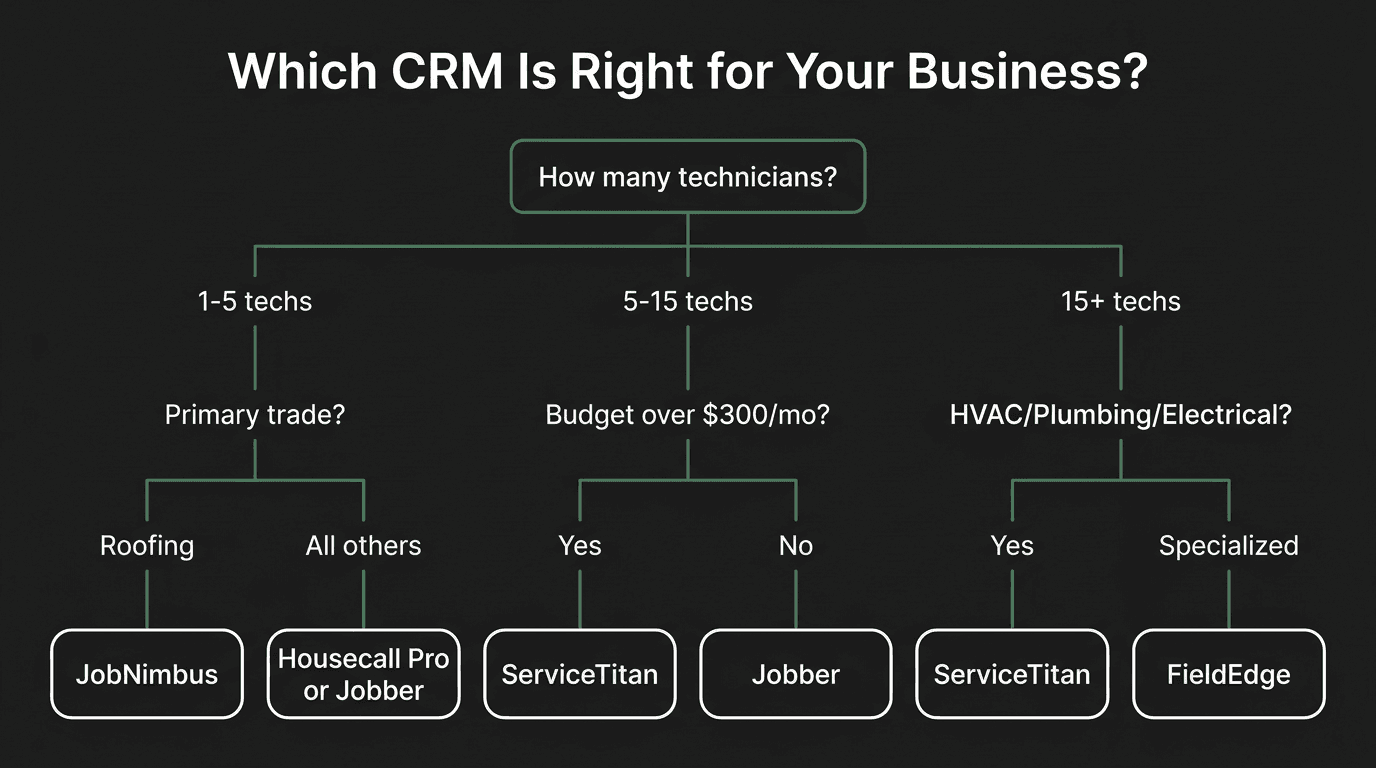
There is no single "best" CRM — only the best one for your specific situation. Your trade, company size, and budget all factor into the decision. Use this framework to narrow it down.
Step 1: Match Your Trade
- HVAC: ServiceTitan for 10+ trucks with budget for it. Housecall Pro or FieldEdge for smaller operations. Jobber works if you want simplicity over specialization.
- Roofing: JobNimbus is the clear winner — especially for storm work or insurance restoration. Housecall Pro for smaller residential-only roofers.
- Plumbing: ServiceTitan, Housecall Pro, or FieldEdge all handle plumbing well. Pick based on company size and budget using the criteria below.
- Electrical: Jobber or Housecall Pro for smaller shops. ServiceTitan for larger electrical contractors who need advanced reporting and dispatching.
- Multi-trade: Jobber or Housecall Pro offer the best trade-agnostic platforms. Avoid heavily specialized CRMs if you run multiple service lines.
Step 2: Company Size
- 1-5 technicians: Housecall Pro or Jobber. You need simple, affordable, and fast to set up. Don't overcomplicate it.
- 5-10 technicians: Housecall Pro or FieldEdge (for HVAC/plumbing). JobNimbus for roofing at this size. You need real dispatching and QuickBooks integration.
- 10+ technicians: ServiceTitan or FieldEdge (HVAC/plumbing/electrical). JobNimbus (roofing). You need advanced reporting, pricebook management, and marketing attribution to manage at scale.
Step 3: Budget
- Under $200/month: Jobber (starting at $49/mo), Housecall Pro (starting at $65/mo), or JobNimbus (starting at $49/mo) are your only realistic options at published pricing.
- $200-$500/month: Mid-tier Housecall Pro or FieldEdge plans give you dispatching, pricebooks, and stronger reporting.
- $500+/month: ServiceTitan and FieldEdge enterprise tiers unlock everything: marketing attribution, advanced analytics, and multi-location support.
Step 4: Must-Have Features
- Dispatching is critical: ServiceTitan or FieldEdge have the strongest dispatch boards. Housecall Pro's is adequate for smaller teams.
- Insurance claim workflow (roofing): JobNimbus is the only CRM on this list built for the insurance restoration process.
- QuickBooks Desktop is non-negotiable: FieldEdge has the best QuickBooks Desktop sync. Others integrate better with QuickBooks Online.
- Marketing attribution matters: ServiceTitan is the clear winner here with built-in call tracking and revenue-by-campaign reporting.
- Ease of use is the priority: Housecall Pro and Jobber win on simplicity and mobile experience. Your techs will actually use them.
Step 5: Migration Considerations
- Switching from spreadsheets: Any CRM on this list will be a massive upgrade. Start with the simplest option (Housecall Pro or Jobber) and grow into a more complex one if needed.
- Switching between CRMs: Export your customer database, job history, and equipment records before deactivating your old system. Most CRMs accept CSV imports.
- Coming from a general CRM: If you're on Salesforce, HubSpot, or another non-trade CRM, you'll immediately benefit from trade-specific features like dispatching, pricebooks, and field invoicing.
10) CRM Migration Tips
Switching CRMs does not have to be painful. Plan for 2-4 weeks of transition and follow these steps to avoid losing data or disrupting your operations — regardless of trade.
Your Migration Checklist
- Export everything first. Download your customer list, job history, equipment records, maintenance agreements, and any notes or attachments. Most CRMs let you export to CSV. Do this before canceling your old account.
- Clean your data before importing. Remove duplicate customers, fix misspelled names, standardize phone number formats, and merge records for the same address. Importing dirty data into a new CRM just transfers the mess.
- Run both systems in parallel for 1-2 weeks. Enter new jobs in the new CRM while keeping the old one active for reference. This gives your team time to adjust without losing access to historical data.
- Train your team before going live. Schedule dedicated training sessions for office staff and field techs separately. Office staff need to learn dispatching and invoicing; techs need to learn the mobile app.
- Set up integrations early. Connect QuickBooks, payment processing, call tracking, and your marketing tech stack before your team starts using the new system day-to-day.
- Designate a CRM champion. Pick one person on your team who learns the new system deeply and serves as the go-to for questions. This prevents bottlenecks during the transition period.
Timing Your Migration
The best time to switch CRMs is during your slow season. For HVAC that means spring or fall shoulder seasons; for roofing, late winter; for plumbing and electrical, after the holiday rush. Lower call volume means less pressure on your team while they learn the new system. Avoid migrating during peak months when every minute of downtime costs you money.
Don't Cancel Too Early
Keep your old CRM account active for at least 30 days after fully switching over. You will need to reference historical job records, customer notes, and equipment details that may not have transferred completely. Most CRMs offer a reduced "read-only" rate if you ask.
Frequently Asked Questions
What is the best CRM for small home service companies?
For small home service companies (1-10 techs) across any trade, Housecall Pro or Jobber offer the best balance of features and affordability at $49-$150/month. They cover scheduling, dispatching, invoicing, and basic marketing without the complexity of enterprise tools. Roofing contractors should also consider JobNimbus at this size.
Which CRM is best for roofing contractors?
JobNimbus is the leading CRM for roofing contractors, especially those doing storm work or insurance restoration. It handles insurance claim tracking, aerial measurement integrations, and the roofing sales pipeline better than any general-purpose field service CRM.
Is ServiceTitan worth the cost for home service businesses?
ServiceTitan is worth it for HVAC, plumbing, or electrical companies with 10+ technicians and $1M+ revenue. The advanced reporting, marketing automation, and call tracking features justify the higher cost at scale. Roofing-only businesses and smaller companies typically find it overly complex and expensive.
Can I switch CRMs without losing my customer data?
Yes. Most home service CRMs offer data import tools or migration support. Export your customer list, job history, and equipment records as CSV files before switching. Budget 2-4 weeks for a clean transition and keep your old system in read-only mode for 30 days after going live.
Can one CRM work across multiple trades?
Yes — Jobber and Housecall Pro are the best options for multi-trade businesses because they are not locked into a single trade workflow. ServiceTitan also supports HVAC, plumbing, and electrical under one account. Avoid JobNimbus and FieldEdge for multi-trade operations as they are too specialized.
The Bottom Line
The best CRM for your home service business is the one your team will actually use. A $400/month platform that sits half-configured is worse than a $65/month tool that your techs open every morning. Start with your trade, then your company size and budget, prioritize the features that solve your biggest pain points, and don't be afraid to start simple and upgrade later.
Every CRM on this list will be a significant improvement over spreadsheets and sticky notes. The key is choosing one that matches where your business is today while giving you room to grow. Take advantage of free trials, get your team involved in the decision, and plan your migration for the slow season.
If you're not sure which CRM fits your HVAC, roofing, plumbing, or electrical business, get a free audit. We'll review your current setup, recommend the right tools, and help you build a tech stack that actually drives revenue.